Time Log
Semester 1 - First Half
Week 1: 2 Mar - 8 Mar
Had first meeting with Sulo at Opus on Friday, confirmed my project would be Sitebook. Briefed on the outline of what Sitebook was expected to be - basically and in-house app store, although was told very little information about it. I looked at various online App Stores such as Google Play Store and the Apple App Store, and used these to get some ideas of what my project will possibly entail. I also researched into various web technologies and spent time building my website.
Week 2: 9 Mar - 15 Mar
Received documentation about Sitebook and spent the week researching the technologies defined in the documentation - mainly Microsoft Azure and Microsoft Intune. The internal website must be integrated with these technologies. The documentation was quite vague, and I was told I will have a more in-depth meeting and discussion about the project next week.
Created a timeline and did initial design and technological planning, creating a checklist of all the features that Sitebook will entail and also brainstormed ideas of which technologies may be used in this project.
Week 3: 16 Mar - 22 Mar
On Monday, the Sitebook project was withdrawn.
Worked on and completed my website and created a generic powerpoint for the first presentation.
On Friday had a catch up meeting with Sulo at Opus to discuss the Sitebook withdrawal. She also assured me that they are happy for me to still complete a project with them and they are currently discussing ideas.
Week 4: 23 Mar - 29 Mar
This week, as I did not have a project to focus on, I researched into latest web development technologies as I expected my next project to be web-based.
Week 5: 30 Mar - 5 Apr
Had a meeting at Opus on Wednesday and was given my new project, known as the CommsSite. Outlined the brief of my project and discussed various technologies appropriate for my build, although the technologies are quite flexible and Opus is happy to discuss anything I am wanting to use. Weekly meetings were set up and a goal to be completed in 3 weeks time - the build of a Home page as a starting point for the agile development of the Job Logging system.
After the meeting, I begun decided upon my technologies to use - HTML/CSS/JS, MVC vs PHP, pgadmin3, Twitter Bootstrap vs AngularJS. I begun my report and documented my research of these technologies.
Semester 1 - Mid Semester Break
6 Apr - 12 Apr
Drew up the initial design of the 'Home' page which is the first page that will be displayed after login.
I also set up my environment by installing and learning to use pgadmin3 along with postgreSQL and I created a local database on my machine. I installed the software needed to create my web application - Visual Studio 2013, as I will be creating an MVC project.
13 Apr - 19 Apr
I spent the first week of the break learning to use ASP.NET MVC and completed a set of tutorial videos which enabled me to create a simple project of my own. I was also given the option of whether I would prefer to use MS SQL Server instead of PgAdmin3 as it is easier to integrate and use within VS. I considered this, and decided to use MS SQL Server which uses T-SQL and created a local database using T-SQL.
Semester 1 - Second Half
Week 6: 20 Apr - 26 Apr
This week, I begun creating the MVC project for the COMMS site. My goal was to create a simple homepage which connected to the local database I had created. I implemented a tabbed view which allowed the data to be queried on the Status of the communication - Open or Overdue and managed to display the data correctly.
Week 7: 27 Apr - 3 May
Had a catch up meeting on Monday at Opus about the project, and I was assigned goals of features that the site should be implementing. This goals were then given a priority rating so that I have some direction in terms of functionality.
After the meeting, I looked into setting up Microsoft Azure so that I will be able to share my project with various people at Opus to gather feedback and help from them if I require. I also looked at various Dashboard layouts online, as one of the things that arose from the meeting was the creation of a dashboard page that was interactive and fun for the user to look at when they first log into the system. Another thing that came in the meeting is the importance of user experience from the site and the vision of capturing not only the functionality for the fun element as well.
Next week, I will have the opportunity to contact some of the users of the current system and ask them a few questions about their use of the current system to gain some insights and direction for the new site. I created the questions that I will ask these users.
In terms of the MCV project, I focused on the layout of the Home page and created the navigation bars of the site. I used an open-source dashboard page layout and incorporated this into my project, which I will modify within the next few weeks.
Week 8: 4 May - 10 May
As this project required a new database structure to be created, I was asked to design an ERD of the current database I was using along with my site. I provided the following ERD:
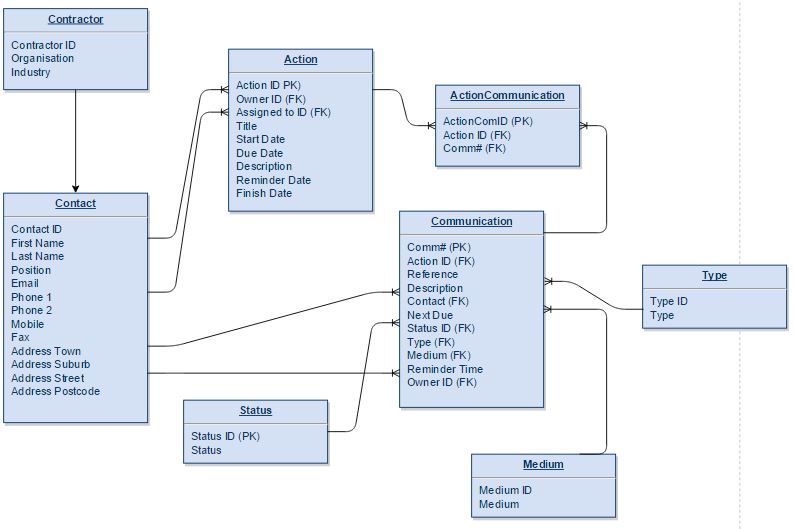
I used both the current Comms internal and external site to determine the attributes that the tables would need. I also made it consistent with the data that the user will need to enter in regards to people, communications and actions. One of the goals for the project is to enable to data they enter to be more flexible as the site must cater for many different industries and employee needs, therefore, the user may be allowed to create custom fields, which I have not yet catered for as this is not a current priority of mine, but something I will bear in mind when I am creating the site.
This week, I also conducted a user survey by sending out my questions about the usability and thoughts of the current system. The questions I asked were:
- What is your main purpose of using OpusCOMMS?
- When creating communications, activities or people, did OpusCOMMS ask for the appropriate information?
- If you could change one thing about OpusCOMMS, what would it be?
- Is there any additional features or tools that you would like to see on OpusCOMMS that would enable your use of it be more efficient or easier?
- How would you describe your overall experience with OpusCOMMS?
In terms of the site, I focused on getting the layout just right and editing the open-source dashboard layout. I also updated the site to cater for the changes in the databases which I made this week, which as I added more databases to my model has taken a lot of my time this week. Week 9: 11 May - 17 May
This week, I worked with my suggested database structure as I am still waiting for confirmation of the actual database structure this project will use.
I begun to implement the 'Add A Communication' feature. I learnt how to add data into the existing database from the asp.net MVC project, and implemented this. However, it was just a simple implementation, being stored in one table. My goal is to ask the user for the following details:
- Title
- Date Received
- Contact
- Type
- Medium
- Reference
- Description
Week 10: 18 May - 24 May
During the week, I worked on the 'Add A Communication' page. I focused on implementing each data field individually and mapping the stored input back to the correct form that should be stored in the database.
To begin with, I generated an automatic unique identifier to be stored in the Comm# field of the database, this is to uniquely identify the communication.
Next, I focused on mapping the Contact back to the ContactID which is located in the Contact table, and storing this ContactID into the Communication table under Contact. My final goal for this week involved Type, I created a drop-down list of the types available to the user, mapped these back to the TypeID, and stored this ID under Type in the Communication table.
Also this week, I implemented my layout for the Homepage, where users will be able to see their communications that they need to complete. These communications are displayed in way to increase
user experience and designed in a way to accommodate the needs of the users. The communications are grouped by due dates and by the tabs "Next Due On", "Open Comms" and "Overdue".
Week 11: 25 May - 31 May
This week, I completed the Homepage and implemented the progressive disclosure design that I wanted.
To begin with, the user is displayed all of their communications that have been assigned to them. The
information that is displayed is the Title and Description. This is grouped by the "Next Due" date.
When the user is increased in a particular communication, they can click on that communication, and
it drops down to display more in-depth details about that communication. This is my solution to not
displaying the data in a table format, which is currently implemented in the existing OpusCOMMS site.
Week 12: 1 June - 7 June
As the due date for the mid-year report is approaching, I allocated a large portion of my weekly
time, during weeks 11 and 12, towards working on that report and ensuring it was appropriate to hand in.
In relation to the project, I continued on the 'Add a Comm' form and worked on the Type field.
The type field implements a drop-down box where the user is able to select the Type that the
communication is associated with. This selected Type is then mapped to the TypeID associated with
this Type, and saved in the Communication table as that ID.
Also this week, I edited the layout. Previously, I was using two navigation toolbars, but I believe
that the site will be more usable with just one toolbar.
Exams/Study Week 1: 8 June - 14 June
Added datepickers to the 'Add a Comm' form and completed the implementation of the Type and Medium
fields, both must be implemented as a drop down box. The selection of the user must be added to
the TypeID and MediumID fields in the Communication table, and this has also been implemented correctly.
Exams/Study Week 2: 15 June - 21 June
Did not have time to work on the project this week as I was too busy with exam preparation.
Exams/Study Week 3: 22 June - 28 June
Changed the database structure after learning the primary/foreign key fields will be more appropriate
to work with when they are of datatype int, as opposed to varchar. This change in the structure led to
some issues in my project that I allocated a lot of my time towards fixing.
After this, I focused on the Contact field. The field required the data of the FirstName and LastName
attributes to be grouped. I did this by creating a new attribute of FullName in the Contact class.
This solution enabled the desired output.
Mid-Year Break
Week 1: 29 June - 5 July
Completed the 'Add A Comm' form by ironing out the issues that the datepicker was causing and ensured the startDate was auto-filled to today's date. Allowed the user to have the option of not assigning a Contact to a particular comm. By selecting a blank Contact, this is added to the record as an 'Unknown Contact'. Also further tweaked the layout to coincide with the requirements of the form input. These changes involved ensuring the fields were the appropriate length and height for the desired input.
After completing the correct implementation of the 'Add A Comm' form, I began to design the basic layout of the 'Add A Person' form. This form is necessary for creating a Contact who is not already available in the Contact database.
Week 2: 6 July - 12 July
Made further changes to the database as the previous Contractor table I had designed was not fit
for what was required. I had previously designed this table for the use of external contractors
only, so that their data could be managed. However, it appears that this extra data could be collected
in the Contact table, and instead Contractor can be used to manage the different organisations that
contacts can belong to.
Completed to 'Add A Person' form and began designing the 'Add An Action' page and modal box. To 'Add An Action',
the current system is set up to have a separate page for adding an action. However, I want to allow the creation
of an action via a modal box as I believe this will be a more user friendly implementation.
Week 3: 13 July - 19 July
This week I worked on the 'Add An Action' form that is implemented on the 'Add An Action' page. I
allocated the rest of my time on preparing for the mid year seminar that is scheduled for the first
week of semester 2.
Semester 2 - First Half
Week 1: 20 July - 26 July
Continued working on the 'Add An Action' form and completed its implementation on its own page. I then began implementing the modal box that is available from the My Communications page. From this page, users will be able to select their comm of interest, and add an action to that communication. The modal box took a large portion of my time, as I was unfamiliar with the concept. After both the page form and modal form had been implemented, I worked on mapping the input data back to the Activity table to be saved.
Week 2: 27 July - 2 Aug
I completed the save of the input data to the Activity table. After this, I focused on the creation of a tuple in the ActionCommunication table,
this table is a composite table and contains the foreign keys of ActivityID and commID.
Actions can not be successfully saved from the 'Add A Action' page and modal box.
As the functionality of the three main forms for this site are complete. I focused on validating the user
input.
Week 3: 3 Aug - 9 Aug
During the week, Kodie, my supervisor within Opus visited Auckland. We had a meeting at the Auckland office where I was able to show him my progress on the project so far and talk about my implementation. We also were able to talk about where I wanted to go with the project for the remainder of the year.
He was pleased with my progress and the functionality that I have implemented, due to this, has allowed me to choose the areas in which I would like to focus on for the remainder of the project. After the meeting, I spent some time creating a timeline and goals that I would like to achieve before the due date of the project.
This week, I focused on the ability to display the Actions underneath the Communications. I implemented the Actions in the same way that the communications are displayed, using progressive disclosure.
Once this was working, I worked on an algorithm to enable the overdue communications to display in red.
Also this week, I began research into the in-built registration process that ASP.NET MVC makes available for developers. The goal of these mechanisms are to enable handling and security of users' details. I will most likely cater this process for the project's needs.
Week 4: 10 Aug - 16 Aug
After my meeting with Kodie last week, I decided to focus on being able to using JavaScript within my project. This week, I learnt some basic JavaScript and completed a course online that taught JavaScript, AJAX and JQuery.
I found this course extremely useful and boosted my confidence to use these techniques. My first goal was to update the status of the actions. I implemented a dash icon next to the actions, and upon clicking them, the dash changes to a tick and the corresponding fields in the database are updated to save this change.
For this process, I used AJAX to pass the object to the controller and JavaScript to update the View.
Week 5: 17 Aug - 23 Aug
This week, I finished the quick status change that I started implementing last week. I also attempted to add a hoverover to alert the user of the change that they had made.
However, I ran into some issues with the JavaScript that I was writing and the hoverover did not appear correctly.
I decided to leave this issue for now, and focus on the User registration and Contact registration process. I began to manipulate the default ASP.NET MVC registration process to cater for this project's needs. I also created a User table within the database to be able to keep track of the users that have access to the OpusCOMMS system.
Week 6: 24 Aug - 30 Aug
As the project is maturing, it was suggested by my supervisor within Opus that I sign up to Visual Studio Online and begin to learn about hosting my project online and push my solution to be available on Visual Studio Online.
I was able to do this, however, my supervisor would also like a WebApp of my project to be hosted via Microsoft Azure. There were some issues with being able to do this, probably related to my access rights.
Also this week, I continued working on the User and Contact registration process and a solution to the User/Contact scenario, where a User is not necessarily a Contact, and vice-versa. This solution included setting up an additonal form
and implementing the ability to update a Contact, where previously only the create a Contact was implemented.
Mid-Semester Break
Week 1: 31 Aug - 6 Sep
During the week, I completed the previous week's work that I had begun, this was completing the User/Contact registration process. When completed, I focused on client-side validation of all the forms that have been implemented in the project.
Week 2: 7 Sep - 13 Sep
As all the development team for Opus is located in Christchurch, I had the privilege of being able to visit the Christchurch office for the day and give a demonstration of my project so far. This trip involved a full day of demonstrations and presentations from the members of the team.
Due to this trip, my week mostly consisted of preparing my project for the demonstration.
Semester 2 - Second Half
Week 7: 14 Sep - 20 Sep
Still waiting on my Azure account to be set up - this should be done by the end of the project so that my web application can be deployed from within Opus. During my catchup meeting with my supervisor at Opus, we planned out the remaining weeks left of my project. Ideally, the coding of the project should be completed around week 9 or 10 so that I am able to focus on the evaluation phases of my project. The goal for the next few weeks is to amend any bugs in the project and get the project in a completed stage.
I spent my week testing the project and fixing bugs that were present in the code. This involved the fixing of the Registration page as the validation rules were not being executed correctly. Also the access to the other pages of the site were restricted to not allow a non-logged user to be able to access other pages. I also began implementing a "Add Organisation" button to allow the user to add an organisation, if the required organisation is not available from the dropdownbox. To finish off the week, I revised the headings and subheadings of my final year report to ensure that I had planned out the content appropriately.
Week 8: 21 Sep - 27 Sep
Kept working on the organisation box that allows the user to add an organistion. Used a modal pop up, and tried to implement AJAX to add it to the dropdown list. Tried lots of different AJAX commands and asked on stackoverflow, however was unable to get this working. Also dealt with the Redirects as some of them weren't quite right and some I realised were not logical. Also found a major bug where the JavaScript on all pages stops running when a user is logged in.
Week 9: 28 Sep - 4 Oct
Kept working on the organisation box that allows the user to add an organistion. Used a modal pop up, and tried to implement AJAX to add it to the dropdown list. Tried lots of different AJAX commands and asked on stackoverflow, however was unable to get this working. Also dealt with the Redirects as some of them weren't quite right and some I realised were not logical. Also found a major bug where the JavaScript on all pages stops running when a user is logged in.
Week 10: 5 Oct - 11 Oct
Fixed all the bugs that were present in the code, and finished all the tasks that were needed to get this project to a presentable state.
Changed the Organisation dropdownbox back to a textbox as I no longer have the time to focus on this issue.
Also this week, I worked towards finding a solution to deploy the web application, as it does not look as though I will be able to deploy the web application within the Opus portal.
Week 11: 12 Oct - 18 Oct
This week, I focused on the deliverables of the BTech course. These deliverables are the final year report and the final year presentation.
Week 12: 19 Oct - 25 Oct
This week was also spent working on the deliverables, and preparing the project for the presentation.