Opus Meeting 1 - 20th March 2014
I had my first meeting today with my industry supervisor, Dr. Sulo Shanmuganathan from Opus Consultants Ltd. I got a brief about what Opus does, and a little bit more about the company. After a tour around the office, Sulo then showed me the intranet system they used at Opus and what my project exactly requires. The project consists of adding new functionality to their existing intranet systems in order to help improve their internal business practices.
Every employee at Opus has their own profile page that can be searched for by an other Opus employee. The profile page consists of the following information:
- Employee Name
- Qualifications e.g. PHd
- Photograph
- Contact Information
- Office Address
- Key Roles
- Responsibility
- Skills
- PIN
Sulo wants to be able to display a list of research papers and publications that have been written by each employee and for it to be displayed on the profile page.
Currently users are not keeping their profile pages updated about themselves, therefore it is unlikely users would add publications on their own manually and keep it updated. The solution to this is to get this information off the internet dynamically. The process involves searching for a User on the internet, mapping the user to the correct person on the internet, and connecting to different publication services to retrieve and display publications and papers of that user.
Some of the services include Google Scholar, Web of Knowledge, Scopus/Science Direct etc.
Along with the following information there is the ability to edit ones profile. The problem is that employees are not maintaining their profiles and are not updating it. One of the reasons this is the case is because the system to maintains one profile isn’t very intuitive. The interface to change ones profile is complicated and consists of many forms. It’s very unclear what exactly each form is and overall looks very messy.
Sulo wants me to improve this interface to make it easier for someone to manage their own profile. This may include a redesign of how profiles are managed. She also said there are a few more things that will need to be done to help improve their intranet system – but more on this when I next come
Opus Meeting 2 – 27th March 2014
Today I got told about what else I need to implement for my project. Since users move around a lot in Opus – Sulo said it would be nice if they could improve how users show their location. Currently they simply edit a page on the intranet system with their physical location.
Potential Concepts:
- Users being able to see the position of another user on a map – information still has to be manually entered, but it will give users a visual representation of where the location is.
- Another possibility is for a user to see their own information on the map too. We could maybe show your own location and the other searched user's location and possibly display something like directions between where you are – and where the person you are trying to locate is.
- Geo-locating information and check ins. This would mean getting the users location via one of their device capabilities. The accuracy of information may not be perfect however for the user it simplifies the task. Upon research I found out this can also be done via HTML5 aswell as a devices (e.g. mobile phone's) native capability.
I also shared what I found out about scraping data from the internet about a user. The best method seemed to be using existing API’s For the publications aspect an option would be instead of getting the publications as we go, you can get them one off and save them in a database. This could be run every month or so to ensure the information is updated. This acts like a cache.
Citation Databases:
Google scholar – an API is not provided. In order to get documents you will need to perform a normal Google Scholar search and scrape the results page for the relevant information. The problem is if a layout of a page changes then may need to recode from scratch to get the updated refreshed information. This gives us the ability to do what we want to do – however may lead to stale records and having to re-update code. Most complex solution to implement however largest variety of information.
Secondly, it is not allowed and is a hacky approach which should not be used, especially in a company or organisation. As per Google's TOV (Terms of violations) they include "..automated requests, such as scraping and prefetching. Automated requests are prohibited; all requests must be made as a result of an end-user action."
Scopus and Science Direct - has a Free API that allows you to access things such as publications by a person. Their Free API has some limitations but they can be overcome. There are some limitations such as you can only view the information from the registered IP addresses and some other limits in the free version – so may need to add a few steps to ensure everyone in the organisation can see the information. The paid version requires a large sum of money and so is not an option
Web of Science - is a subscription based option however the API appears to be very open. Again this requires a large sum of money which is not an option. There is no free version unlike Scopus/Science Direct.
Upon discussing the website/mobile into futher detail - the topic of privacy came up. Whether it be a website version or mobile version - both must always ask you whether you want to share your location/want to be tracked whenever you open the application or website. Whether we ask one time upon installing/loading the website or ask every time needs to be decided. There should also be a way to disallow the tracking of information yet still be able to access the functionality of the application.
Secondly, for consistency of information, data may not be entered perfectly every time. A user may enter "100 Beaumont Street Auckland" whereas another user may not enter the "Auckland" part. The mapping system needs to be able to convert these users locations into physical locations. Reverse Geocoding – is the ability for a user to be able to enter a human-form readable address and be able to convert that to a real longitude and latitude. The benefit of such a system is that users can enter an address in any form, yet the system will understand what location they are referring to. Google offers this option in their mapping API. Secondly information may not be kept in a consistent state – however the system understands what is the position they are trying to say and can accordingly save it in a much more consistent format e.g. adding the "Auckland, New Zealand" part automatically.
I also have some questions that hopefully can be answered next week
- What is the programming language being used for to show profiles etc for the intranet?
- Is it possible to get access to the intranet to understand structure etc.
- How can we minimise the work for the Admin team – is the mobile app possibility an option?
- How many various sources are we getting publications from?
- What do we do in the scenario that people have the same name?
- Are we saving these publications in a database somewhere or will we link to these publications externally / is it just a list?
Opus Meeting 3 – 4th April 2014
Today we Sulo and myself had a chat over the phone with Hennie – who works in Information Management and Technology at Opus. He is based in Wellington so we had to chat over the phone.
The questions that I rasied from last time were mostly answered by Hennie from what he knew. The languages used are PHP for the front end system and from what he knew – the conference site uses SQL atleast. The profile page uses WebGUI. Getting access to the intranet system was not an easy process – and the first process was to get me and my laptop authorized in their system. Sulo requested to get my a user account sorted out hopefully by next week.
The mobile application is currently not an option for two reasons – firstly that their intranet system can only be accessed locally within the building by plugging your device into one of the Ethernet sockets, and secondly that there is no wireless connectivity to access the intranet or any wireless connectivity within the Opus office itself. Sulo was also more keen that we rather focus on the stuff at hand.
I showed Sulo my first actual research and publications webpage which uses the Scopus API. Since I do not have access to the intranet system - I have created this prototype locally using PHP and am hosting it locally with a cheap webhost.
Currently what it does is upon entering a person’s name – it searches Scopus for any publications and research articles written about them. As per the research from last week – I am limited to this option for now since Google Scholar has no API, and Web of Knowledge charges a large sum of money for access to their API. What I also realised while designing the current prototype is that it would be quite difficult to uniquely identify a person by just their real name. An example is the name “John Smith” – there may be many John Smith’s who have written many research articles each – so we need some sort of filter or way to distinguish which is the correct John Smith. I’ll need to further look into the API and do some research to see if there is a way to solve this problem.
The results I was getting from searching for a user also need to be formatted into a particular reference style. This is just a matter of formatting my output. I will do this and see if I can solve the unique identification problem by next week.
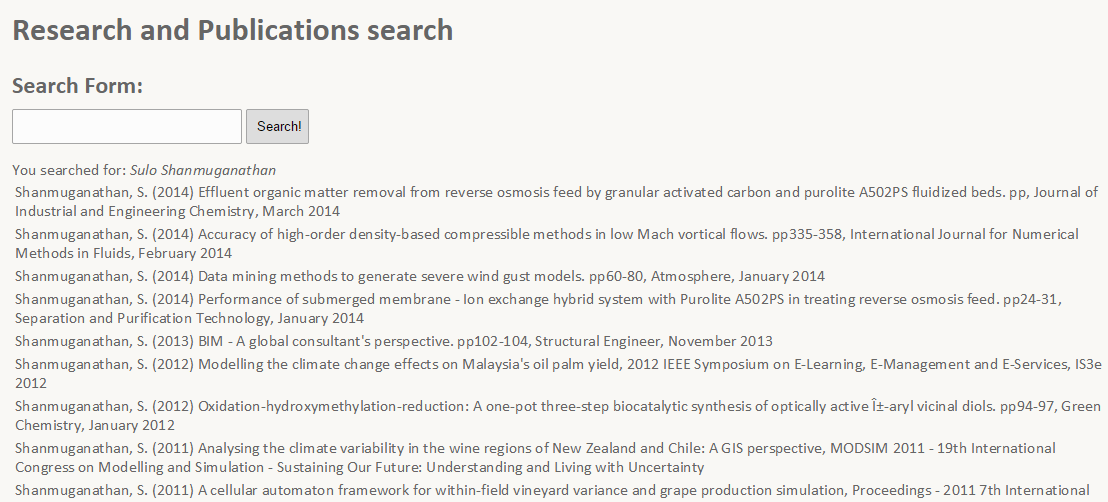 Screenshot from the publication search. Uses the Scopus API to find an author by their last name, and initials of the first name
In the week I also started on the mapping application. This uses the Google Maps API and HTML5 and primarily Javascript in order to embed Google Maps on a webpage. The webpage shows your current location and using Google's API can also perform a reverse geo-coding search. So if a user searches for The University of Auckland, that gets sent to Google's servers which converts the address into a latitude and longitude which is sent to me and then displayed on the Google Map.
The improvement for next week is to be able to add functionality to the maps application such as being able to view multiple users on the map and group them by categories e.g. by different roles - like an overlay on the map. The ability to hide and show these users on request would also be handy.
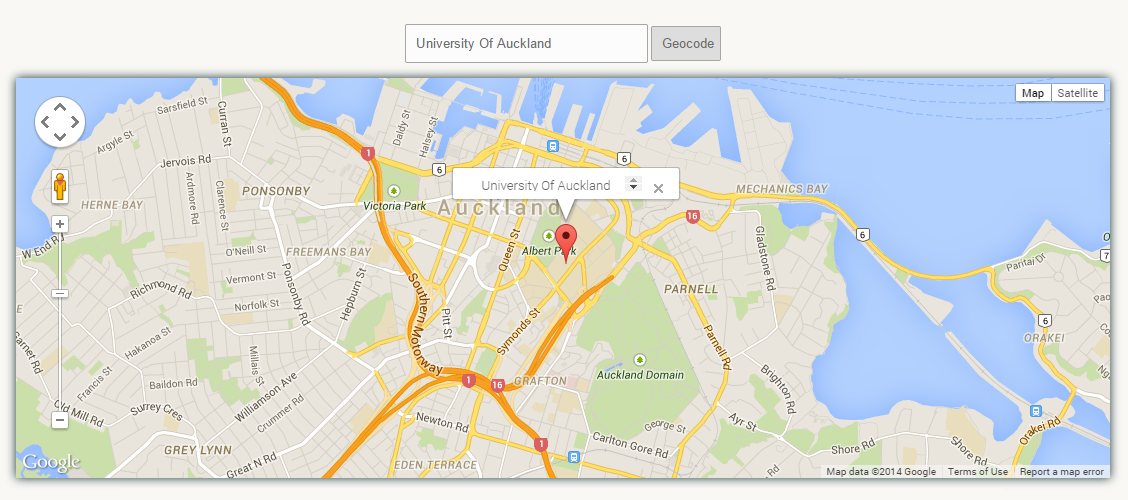 Screenshot of the mapping application. Supports geocoding of information and displaying your own geo-location information.
Opus Meeting 4 – 10th April 2014
During the week I had a think about a solution to last week’s problem. I thought of a solution that would be for every result, add a checkbox/radio button next to each one. If a user correctly can identify one publication that they have written then we can grab the authors ID who wrote that publication and then find out more publications by them. This will help us correctly identify the right author amongst other authors who share the same name – with this unique author ID.
After starting on this what I soon realised is that after continuing working on my prototype is that Scopus’s API access is also very limited. With the free access you can search for a name and retrieve a list of all publications written by the author – however once you uniquely identify which is the correct Author – you cannot find more publications by them which they have written. This is because Scopus does not provide you with the Author ID or the ability to search by Author in the free version. Because of this limitation plus the fact I cannot access other scholarly databases for free, I decided to instead work on the mapping application in parallel and put a hold on this until I could next speak with Sulo.
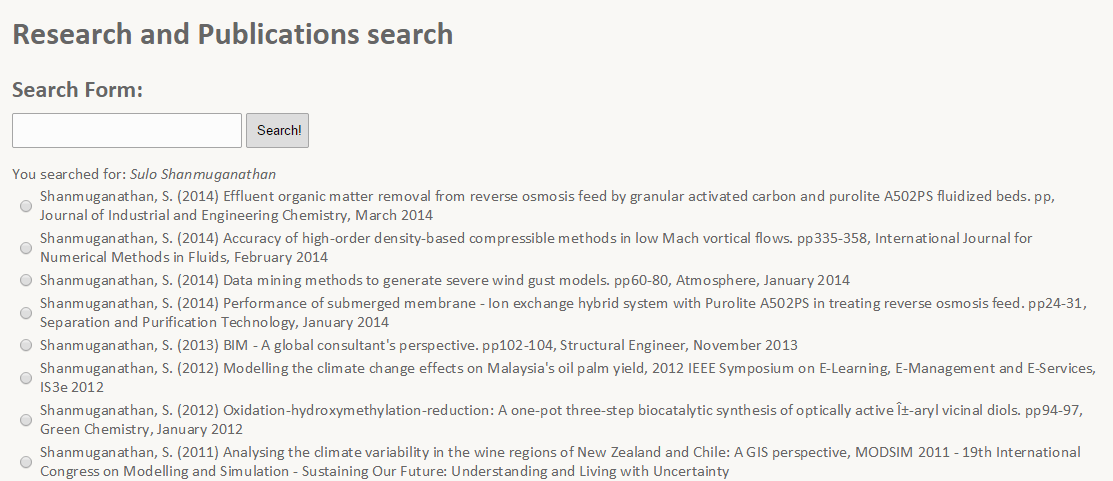 Screenshot of the updated publications search. The checkboxes are used to select a result that is a publication you have written yourself. The page was then meant to show more publications by you (however this was not possible due to API limitations).
I made improvements to the mapping application. The maps page now has multiple map markers over the map in different colours representing different roles of users. These can be toggled on or off by layer. The locations are currently being randomly generated around the Auckland area, but in the future should be read from a database and displayed accordingly.
Whilst adding this functionality of having multiple pinpoints on the map, I realised when you have a large group of people in the same area it became very messy since there were many points in a small area - sometimes even stacked on top of each other. To solve this problem I introduced map marker clustering to the standard Google Maps. Using a library, I created an option to group markers that are nearby to each other and simply display a number in that area representing the number of users in that area. As you move around and zoom that number also changes so it's quite responsive to any actions you perform on the map. I could not show this to Anna (the lady who wanted this mapping functionality) this week but I will do so when we next meet.
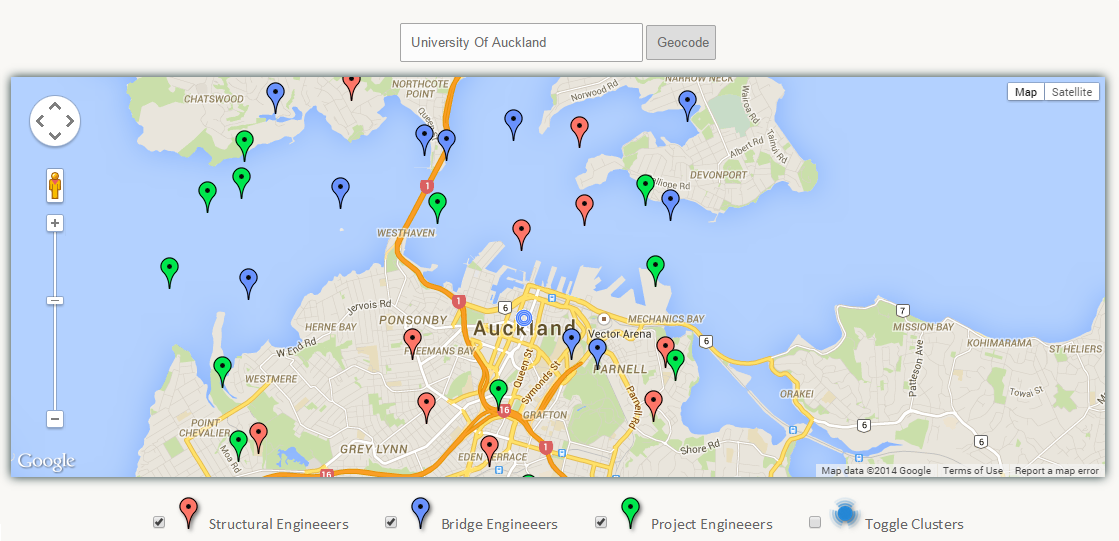 Screenshot of the updated mapping application. Uses randomly generated data to create map markers (hardcoded). Also supports geocoding, toggling the visibility of different markers groups, and marker clustering.
This week at Opus – Sulo sorted out my account username and password. And after some technical difficulties with my laptop being not so compatible, I managed to connect to their intranet system – although I can only access this through VPN at their building. For working on a project where I require to modify their intranet – this may mean I have to visit the company more than I initially thought. The next meeting has been set for the 24th of April in the mid semester holidays.
Opus Meeting 5 – 1st May 2014
We should have had another meeting on the 24th of April, however due to being busy with other commitments in the holidays, I had not made progress since the meeting before and therefore I asked if we could move this meeting to one week later (this week) which Sulo agreed to.
Since last week I have worked on improving the way profiles are managed. The current way of editing your own profile is very confusing - there are a large number of forms with labels and overall the page looks very messy. I brought up some concept prototypes I had created to gather feedback as to which is the most easiest to use.
From what I discovered last week - a lot of information is repeated between users. For example there may be many users who are Structural Engineers - but the way they save this information in their profile may be different. One user may label their role as a "Structural Engineer" whereas another user may write "Engineer - Structural" or "Structural Engineering". There were different ways of writing the same data. Immediately I realised this is not a good thing when it comes to managing the back-end database and for aggregating data together since they would be identified as different pieces of text. One of the solutions to this problem is by offering suggestions - auto-complete. With the form auto-completing options - it allows users to select from a list of pre-existing options - thus bringing more consistency and better aggregation of data.
I brought four options forward as to how we can display these auto-completion options:
- A basic auto-complete box
- A basic auto-complete box allowing multiple values to be selected
- A drop-down autocomplete box
- An auto-complete box with multiple values allowing deletion
The boxes were either retrieving data from a local MySQL database or were hardcoded into the HTML - but all four options could be configured to retrieve data from a database - the hardcoding was done for simplicity and as a proof of concept. From all the four options - the options that allowed multiple values seemed to be the best fit, since it allowed users to select multiple values from a predefined list. Being able to select these multiple features is handy for something such as roles if a person is for example a "Structural Engineer" and a "Water Engineer". Also the last option allows users to delete values which is a bonus. Something I would need to add though is to allow custom values - if in the case a user fits into none of the options then I should be allows custom values to be entered and saved. Also I will make sure all the forms I am using now are accessing their data sources from the database and are not hardcoded.
The list of roles that I was using for my auto-complete form, I gathered by looking at the vacancies and careers positions on Opus's website and copying and pasting as many distinct roles as I could find.
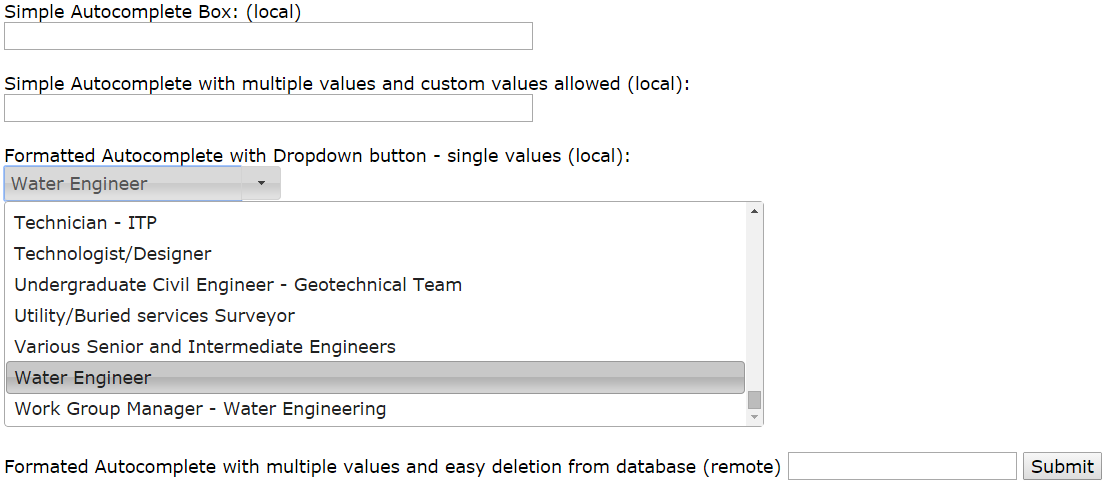 Different possibilities for auto-complete options for the Profile page. This will be used to help users select their roles using an auto-complete box in order to help the user and to better structure data in the database.
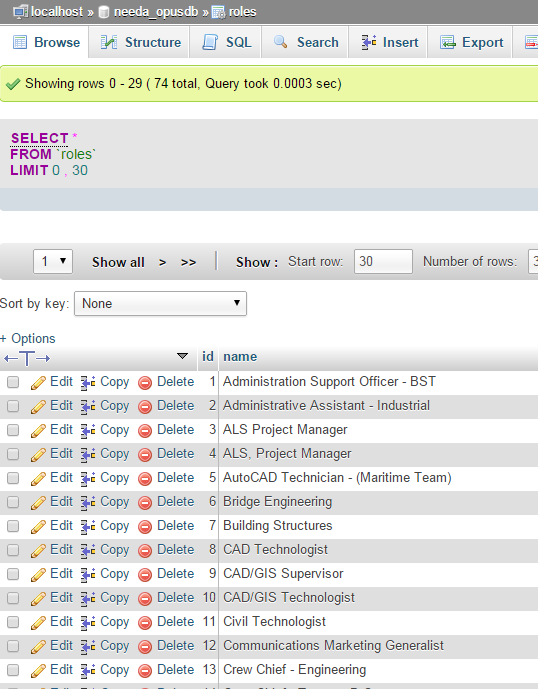 The MySQL database was created with the roles table containing a list of roles and IDs.
Opus Meeting 6 – 8th May 2014
I put a lot of time into my BTech project this week and did a lot in the back-end including getting a basic database working in the background. The database now haws tables for Users, Roles and Skills and filled them with dummy data. I had last time showed a demo of four auto-complete boxes.
These auto-complete boxes now allow custom values if in the scenario the role you want to enter is not in the database, and changed the design to better reflect what forms the page should contain. All the data is now retrieved from a SQL database as opposed to being hardcoded.
Along with the data being retrieved from the database - I can also now select multiple values in a form and upon hitting a submit button - these values are mapped to their ID from the database and saved in a row. This is all done using Ajax - which allows you to save parts of a webpage without reloading it. So the data is all saved without the page changing to another page - making the page seem more dynamic and simple functions can be made to appear simpler (e.g. using modal boxes for success/error messages rather than having to navigate to a new page which says the status/result of the performed action). This differs from traditional methods that don't use AJAX which require the page to be reloaded and updated. This was all done on a test page and I plan to integrate this in the Edit my profile webpage by next weeks meeting.
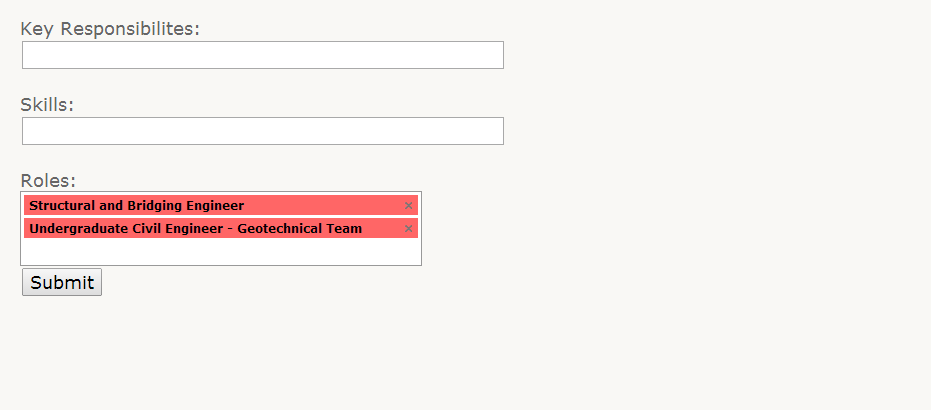 The screenshot is from the updated version of the auto-complete forms I was testing. They have been styled better it supports autocomplete, multiple values, the ability and to delete values.
BTech Introductory Seminar – 9th May 2014
I had my BTech introductory seminar today. I spoke about the problem so far, and demoed the current prototype of the research and publications search. Also demoed was the mapping application and how we can view our own location, distinguish different groups of users (which were currently hardcoded), and also cluster map markers together. I also showed how I was planning on improving the edit my profile page by the four autocomplete concepts that I had created earlier.
Opus Meeting 7 – 14th May 2014
I spent a lot of time this week on working on the actual design of the system. I focused on the "My profile" webpage. First by changing the design to better suit the other pages with the grey and red Opus colours and by using the multiple value input forms since they seem to be the best for storing multiple values of data per field.
Using the dummy data in my database, I also ensured that the data that was being displayed on the page was being retrieved from the MySQL database I set up last time rather than being hardcoded. I showed this updated design to Sulo, and she was already quite pleased as to how the design had turned out.
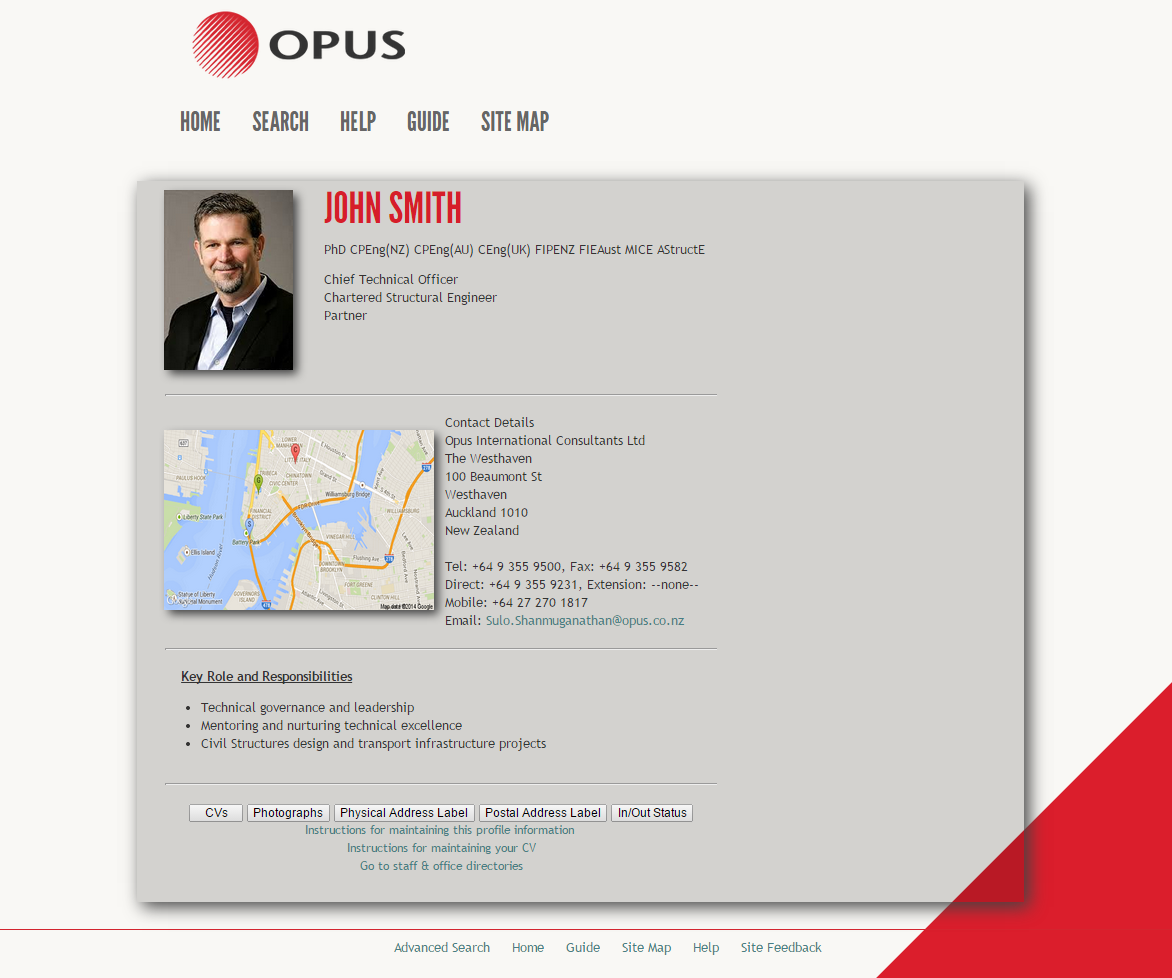 The design of the updated profile page. The values on the page are being retrieved from a MySQL database that I set up locally. The plan is to use this design for the other project pages too such as the maps page and publications search page.
I spoke with my Academic Supervisor earlier in the week. I felt that I was going to finish all the projects that Opus have assigned me pretty soon. He brought up the idea of a mobile application. Sulo introduced me to Murray who told me something similar is being done in Sydney which has the concept along the lines of taking photos on your mobile device for a job and saving that.
I mentioned to Sulo that predicting future progress I should be finished this project early and so would not mind taking on something more. So Sulo told me about another idea on applying for funding for technical applications. She showed me how currently there is a form, which isn't intuitive to fill at all which has fields such as the project title, the project manager and the budget etc and users fill up this form to apply for funding for an application.
At the end of every year they then aggregate these forms into an Excel Spreadsheet and go through each form line by line highlighting the important parts of each application. She said it would be nice for when people to apply for funding online, they can then aggregate this data automatically into a spreadsheet or something rather than having to do this manually. Also if they could upload a PDF along with their application that would be handy. I got the relevant information from her that is needed to apply for an application. This is what I'll be focusing on next week
I came today to meet Aman - but unfortunately he was not available so I got Sulo to email some questions to Aman (IT), such as if we can use the existing database and about getting access to it. I also asked if we can change the current forms they have such as changing fields from plain input fields to auto-complete fields etc.
Also I saved some webpages from the Intranet which I will then use later as a base to improve the design of the intranet. I do not want to change too much of the design so user's do not have to learn new things - while at the same time improving the usability.
Opus Meeting 8 – 15th May 2014
As per last meetings talk with Sulo, I created a form that allows a user to submit a technical funding application. The page has a bunch of fields where a user can enter the details required to their form. It also supports things such as datepickers for dates, number fields for currency, and drop down menus for country selection in order to ensure better data validation and aggregation in the database. Sulo said I would also need to add support for attaching PDF's with applications which I will add on before next weeks meeting.
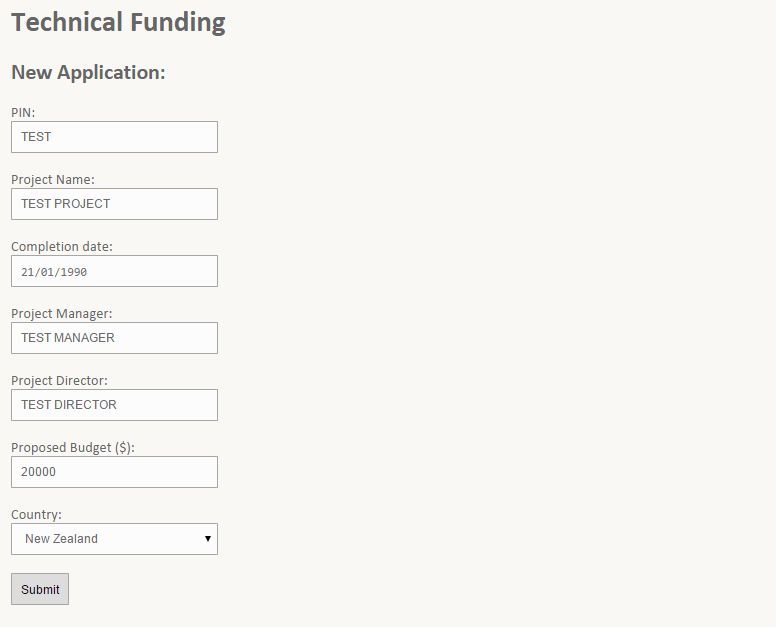 A screenshot of the technical funding applications page where a user can submit an application for funding. All this data is saved in the database, and upon submitting the data it is checked to ensure it is valid.
At the company itself I spoke with Hennie again, who told me more about what he knew about the backend system currently being used. Hennie believed part of the system was using an LDAP database however Opus IT would be transitioning to a Microsoft SharePoint solution soon. As per what he said last time, the front-end system was using PHP, which was great news to hear since the development I had done so far was based in PHP.
As Hennie mentioned, Opus IT was already about to transition from their current backend which he believed used an LDAP database, to a Microsoft SharePoint solution. The SharePoint solution would be using Active Directories to manage the network and users, and could also support a SQL database for the rest of the data (however again we do not know what type of database will be used). So another decision here was do I develop for the LDAP database and later try and migrate that to Microsoft SharePoint when the transition is complete (is it worth the time?), or wait for the Microsoft SharePoint transition to happen and then develop on top of that.
A decision had to be made here about the data we are going to use for the project. The options were whether we use the existing database or whether we start from scratch and create a new database, and later import all data from the existing database.
The result was to ultimately not worry about developing for the old LDAP system, but also not to be waiting for the Microsoft Sharepoint transition to occur. Despite the IT team saying 6 months, it may or may not happen in that time frame. So I was to be continuing developing for SQL on my own local server independent of what the IT team was planning to do. Later all this information would be needed to be migrated to work with Microsoft SharePoint
After speaking with Anna, she gave me feedback about the mapping application I had developed so far. She mentioned about a skills matrix where each user has a set of skills. She explained that she would want to be able to view these users on a map, and to be able to view their skills. Another bit of core functionality would be needing to search for a skill of the users e.g. "Asset Management" and to be able to view all users who are part of the skills matrix with "Asset Management".
I do have marker clustering in the current prototype, however you cannot view information about a cluster. The only information you can see is the number of people in that cluster. Secondly the cluster groups all three types of users together as one cluster (there are currently three hardcoded user groups). The map clustering will need to be modified where you could possibly select a cluster and view all the users in that cluster as done in the previous prototype. She said that sounded fine as long as you could view the faces of people and information about them below on the map without too much difficulty.
Opus Meeting 9 – 22nd May 2014
This week I focused less on the map and more on the edit my profile page. I put a lot of effort in to creating a feature called "Double click to edit". There is now no separate edit my profile page, instead a user can double click to edit any set of text on the page, and the text changes to a textarea that the user can edit. The user can click a save button that saves the updated information in the database using AJAX so there is no need to refresh the page. I had previously gotten this connection to a database using AJAX on a test page, but it was now fully working on the profile page and was providing real functionality.
This double click to edit feature was working like a plugin. By specifying the row names in the database and which paragraph of text it should link to it became very easy to add this feature to multiple text areas on the page. I also got this to understand the context of the double click so it knows whether the field is a paragraph field or a list. If it was a list it displays a token-input box (the red and white auto complete box as shown in a screenshot above) with auto-complete toggled on or off depending on whatever parameter the user specifies.
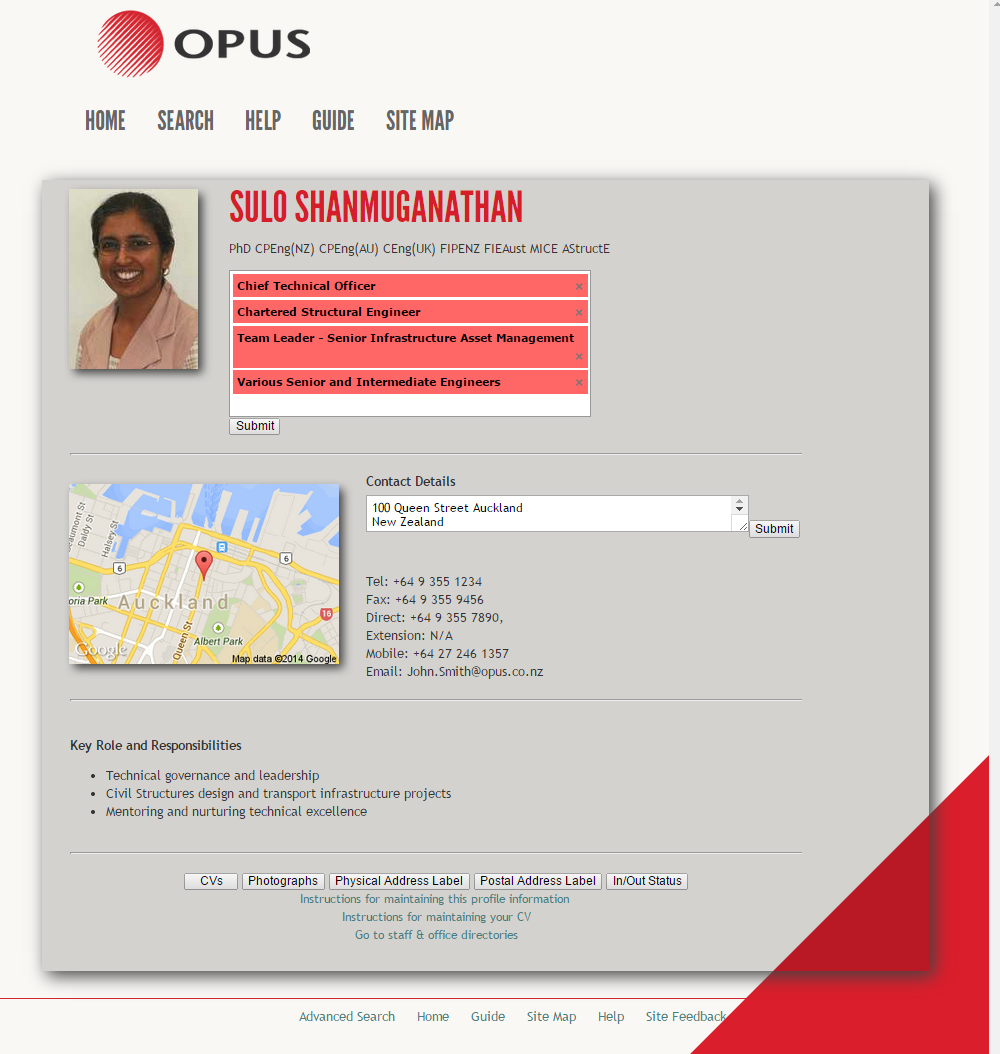 The screenshot of the double click to edit feature on the newly improved design of the profile page. Double clicking a list brings up an autocomplete box with each list item as a separate element. Each element can be deleted or a user can search for a new role and have auto-complete prompt them with existing values from the database.
I showed this to Sulo who was pleased at how this was turning out. There were still some bugs with this double-click to edit feature such as it not working if the list or paragraph had an inline CSS style attached to it or any other attributes, but I was planning on fixing this by next weeks presentation before I demo after that.
I also added the upload PDF button when applying for a new technical funding application. Upon submitting an application, in the admin management panel you also get a link to the PDF that was added with each document, and opens inline as an overlay on the current page, so there is no need to navigate backwards and forwards.
Opus Meeting 10 – 5th August 2014
The focus of this week was ensuring that the profile design was brought across all the pages, so each page looks good on its own and looks good for the presentation. The funding, maps and publications search page were all sporting the design of the profile page. This was done by converting the page into header and footer files and including them at the top and bottom of each page.
 The image above shows an empty template. This is used on all pages that I have created.
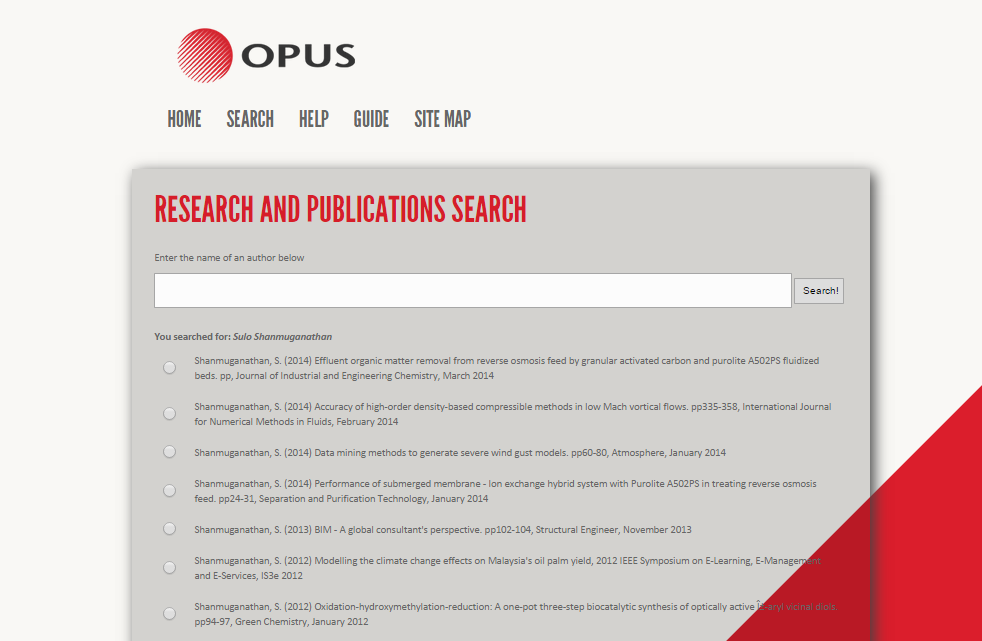 The image above shows the template being used on the publications search page.
All the data from the technical funding applications are also being graphed out in the admin management panel. Pie graphs, bar graphs and a generic table are all being generated from the information. I used two libraries to achieve this functionality.
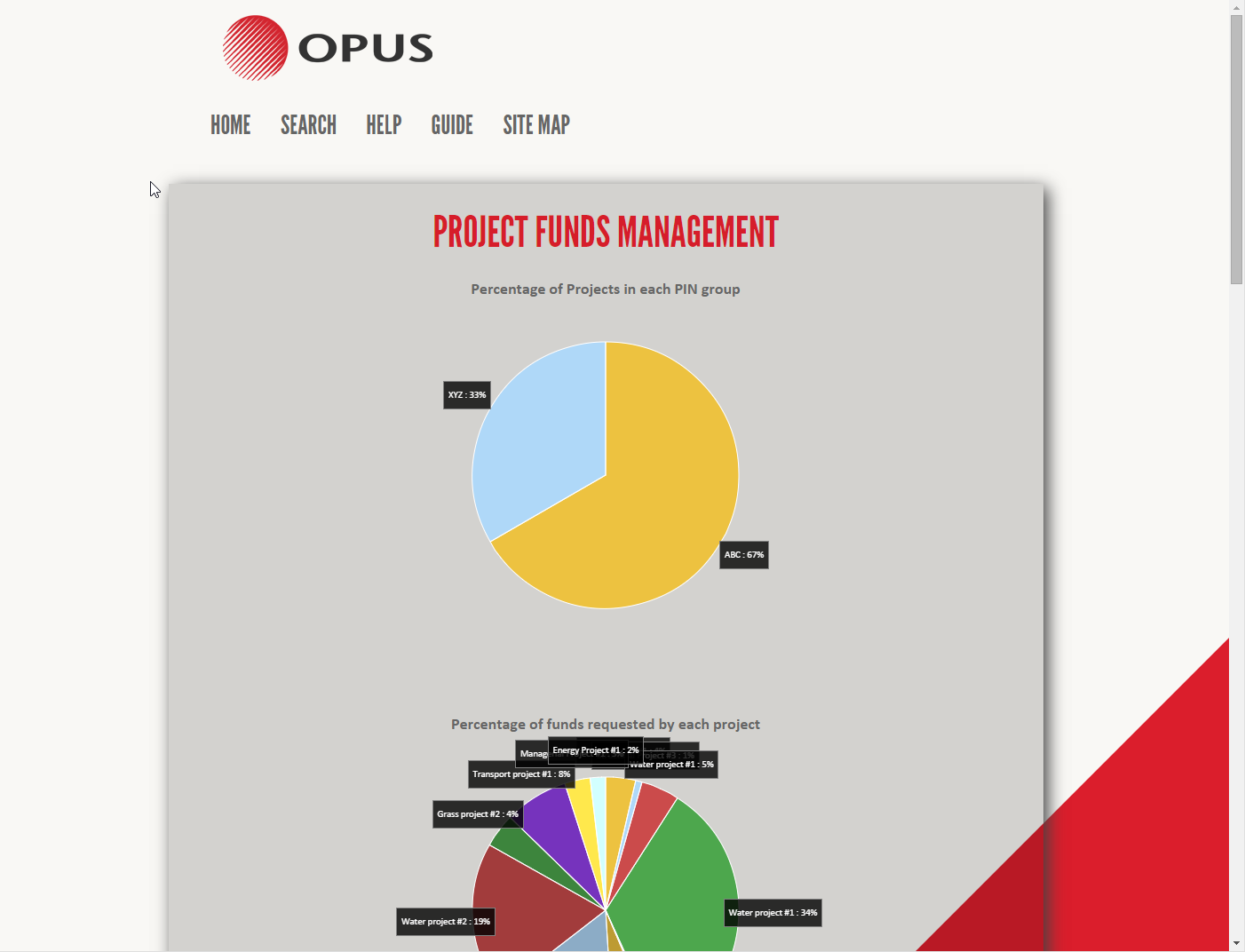
 Screenshots of the technical funding admin management panel. Shows pie graphs, bar charts and also a general data table overview.
The double-click to edit feature was also tweaked to work better. It now supports double click to edit an image and the problem with inline styles has also been fixed. It also dynamically updates the image of the users location upon changing the address in the address field. I demoed this to Sulo at the office. Sulo will be attending my presentation on the 7th of August. My plan for the meeting next week will be to go back to the mapping application and add the functionalities that Anna was wanting me to add such as adding projects to the map as well as people.
Mid Year Presentation – 7th August 2014
Mid-year presentations were today. The presentation overall went well. I demoed the mapping application, the publications search, the technical funding applications and graphs, and the edit my profile page. One of the questions asked was about the "Double-click to edit" feature. In the presentation I did a demo where I edited a "contact" field which consisted of a telephone number, a fax number and an email address. The question was how does the system recognise that there are three different fields inside the one textarea.
The answer to this is that the system does not. For the sake of the demo, and to keep things simple (also because I do not know what the actual database structure looks like), I created the contact field as being one big field. In a real system, the telephone and email address will be saved as different columns in the database.
The link to my presentation slides are here.
Opus Meeting 11 – 14th August 2014
I worked on the mapping application over the past few days, I did not have much time as part of my week went to preparing for the BTech presentation. I decided to redo the mapping application again. The existing map will still be used on the profile page. Since Anna wanted a lot of new functionalities added to the map, it would be best to keep it standalone from the profile page in order not to make the profile map look messy. Anna did agree to this last time.
The new map was edge to edge and took up the full screen. It also had markers with projects and people on it, and clicking on a user map marker would update the information on this "card" on the map with information about the user. Clicking on a project did nothing yet but I planned to do this by next week. Search and the skills functionality would also need to be added in the next iterations of the map. This larger map made it a lot easier to use as there was now more screen real estate to work with and alot more information could be shown on screen since we were using more of the users screen than in the previous version.
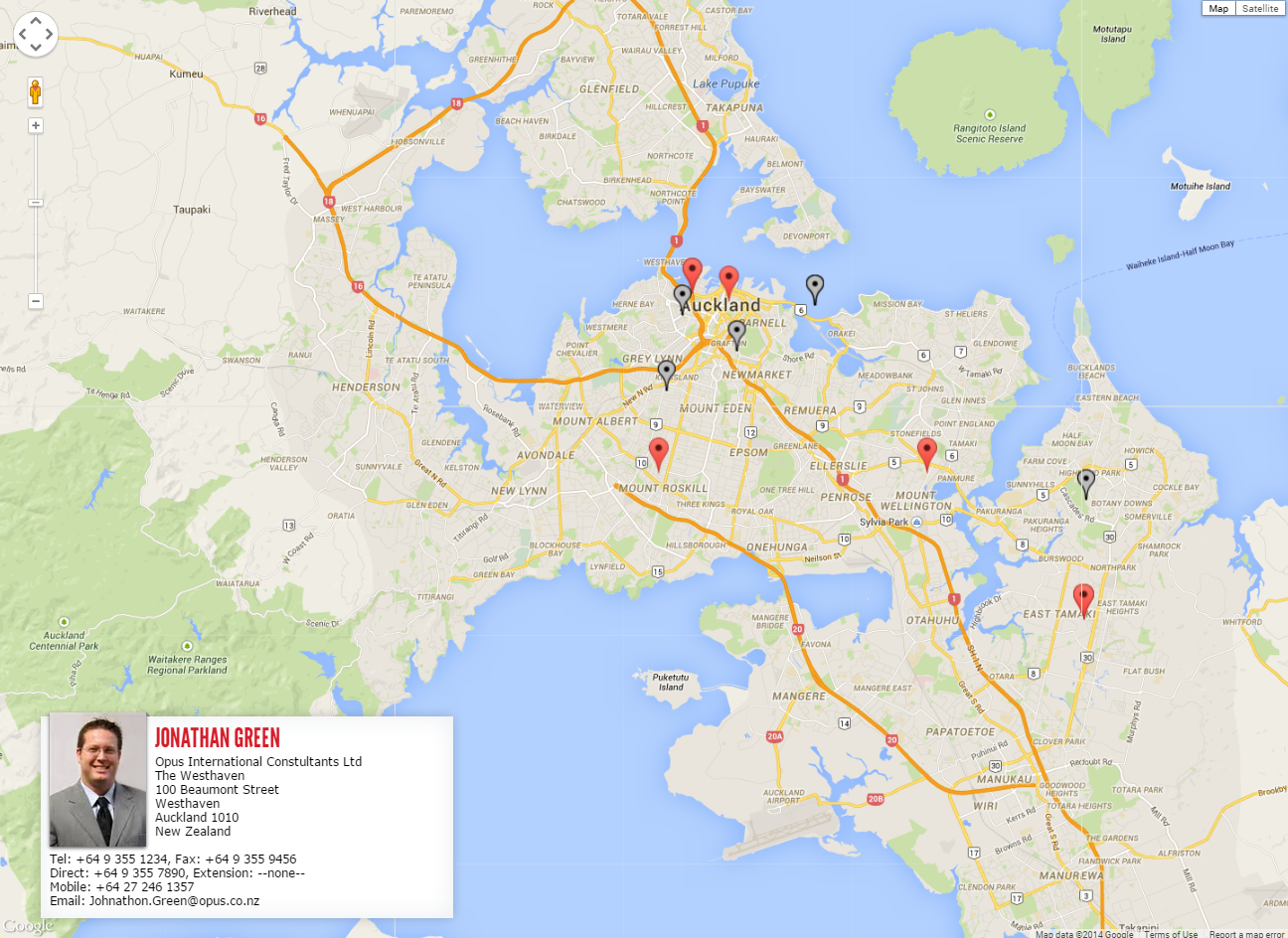 Screenshot of maps application with the users profile "card".
Opus Meeting 12 – 21st August 2014
Over the past week I have been working on the mapping application. The map now has a sidebar for viewing information about projects. Upon clicking a project marker the sidebar opens and the project information is displayed with a list of users in that project. Clicking a user will also show that users information. The sidebar will also be used for showing more information in the future such as settings for the map (such as marker clustering) and also for the search functionality that will be added later
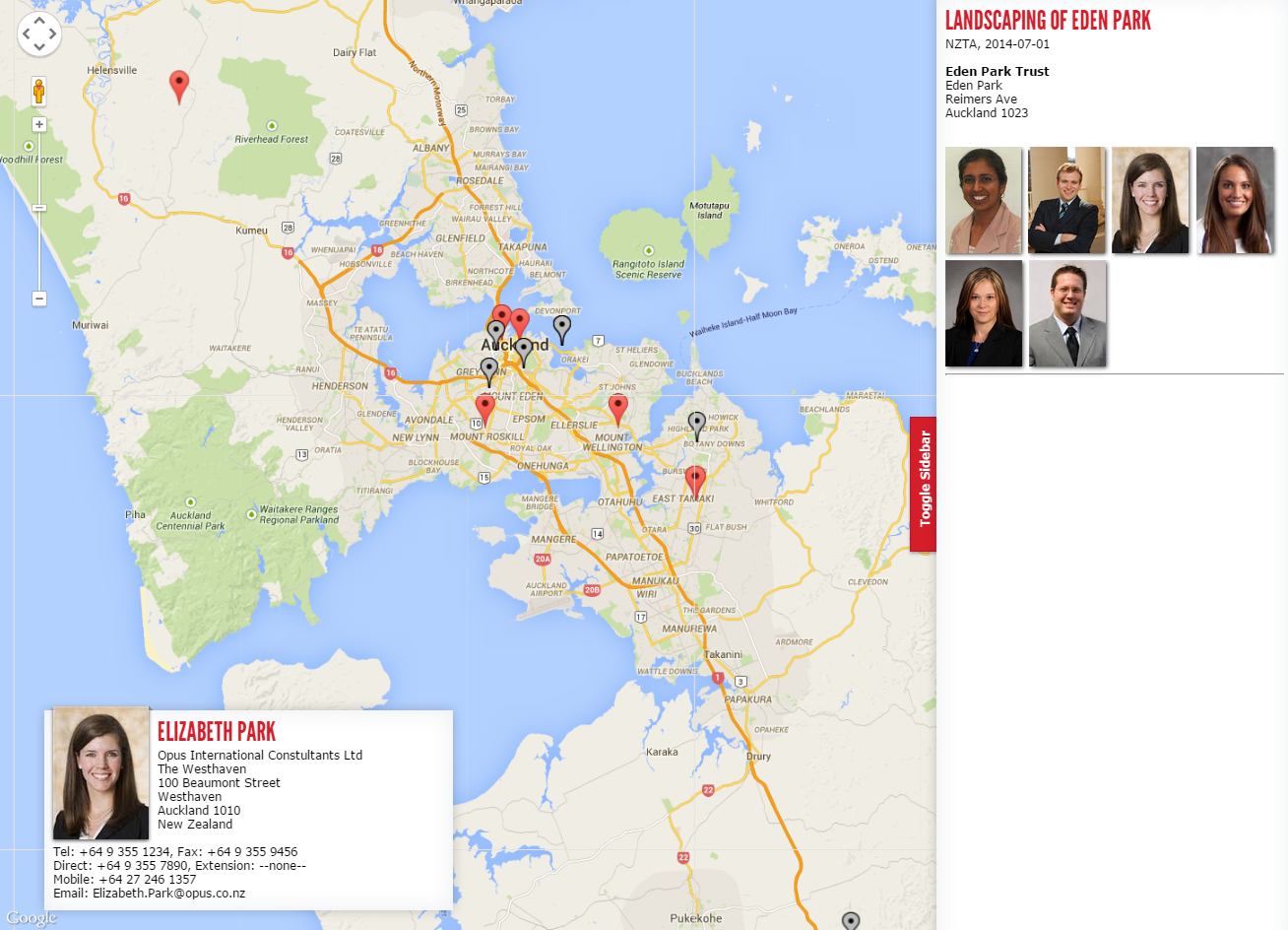 Screenshot of maps application with the sidebar and project information on the right side. Also shows the users "card".
One of the issues was that the clustering that I had on the old map would not work as well on this map since the clusters would group both projects and people together and I needed to somehow create groups to distinguish between the different types of markers. I showed this newer version to Anna who was quite pleased. Again the points that needed to be addressed was the search functionality and integrating the ability to search by and search for users with certain skills in the map. Anna also suggested that when viewing a users information that their marker is also shown on the map.
I also met a guy named Ken this week who was originally in charge of the projects database. The projects database is the database which contains informations about all the projects which Opus has been involved in. Sulo reckoned that he would be able to get access to project information that I could use(not user information). Ken said to speak with a guy named Mitchell to get access. Sulo attempted to contact Mitchell, but he was unavailable. She said she will try get a hold of him before next weeks meeting. I will try to add the search functionality for both projects and people and to integrate the skills matrix by our next meeting which was to be in two weeks from now.
Opus Meeting 13 – 8th September 2014
The meeting got postponed out by a few days since when we thought it would happen, but in this time I managed to mostly complete the complete the mapping application. It now had search functionality similar to how Facebook's universal search works. By linking queries and tables together, rather than having different search boxes for people, projects and locations there was now one search box for all three types of searches. An algorithm I created ranked these results from what I thought would be most relevant to least relevant depending on similarity of the result. I showed this to Sulo and was planning to show this to Anna, however she was not in work and so we had a Skype meeting instead. It all seemed good, the only missing but of functionality was assigning skills to each user and allowing search to also search users skills. Because most of the structure had been set up, adding the skills was not going to be a big thing to add and so I am confident that I can add it by next week. Marker clustering was also working for both projects and people.
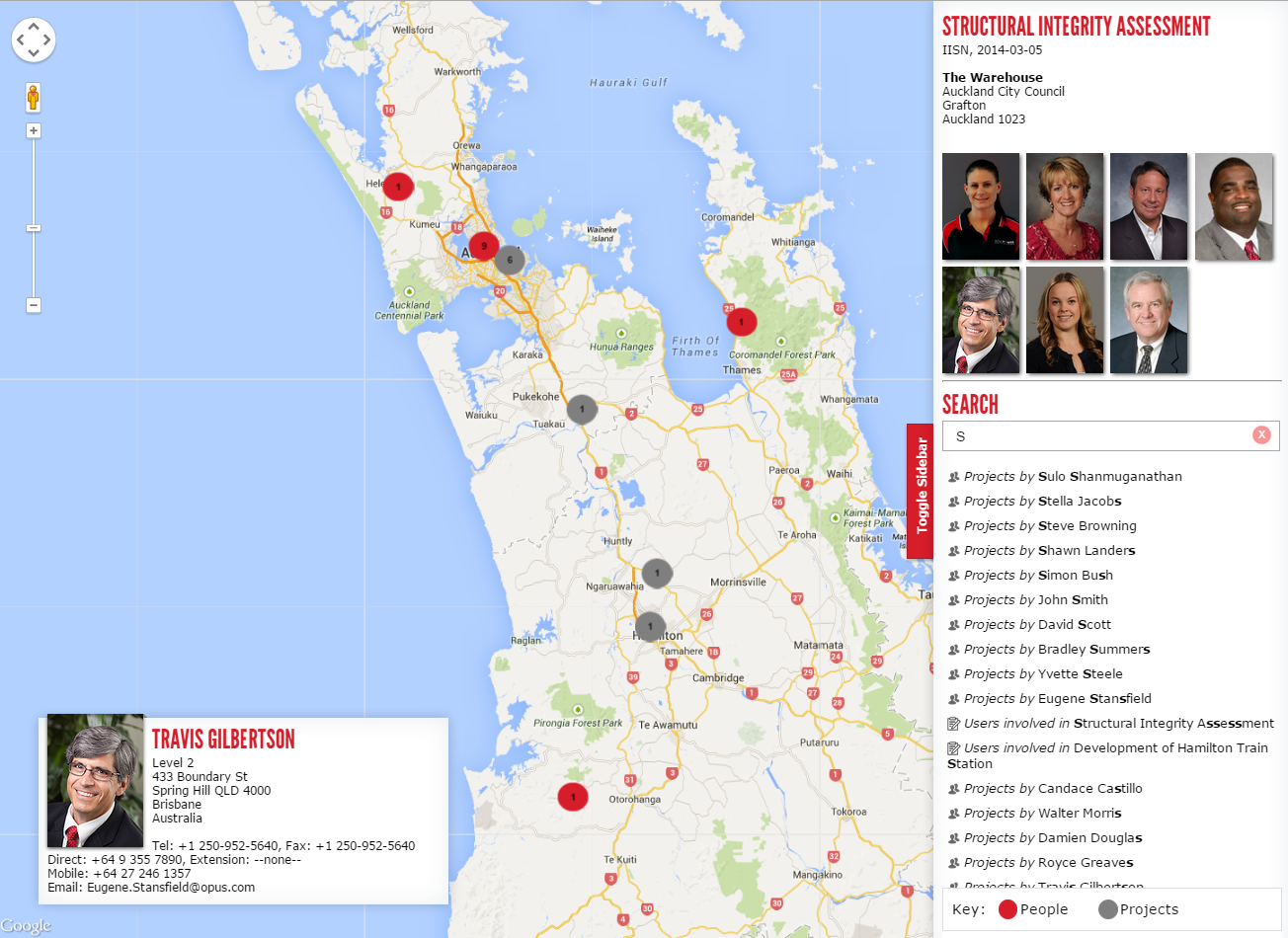 Screenshot of the updated maps application. Supports universal search of people, projects and locations and also has distinctive map marker clustering between people and projects. Skills is the last feature that needs to be added.
I Spoke with Ken about the projects database and showed him what I had done with the map. We thought if we could not get access to the database, then may Ken could give us an old copy of the database which we could use to map the projects rather than using dummy data. However Ken did not have a copy of the existing database and told us our best hope again was Mitchell. Ken also told us that we could try to extract information about the database from the current projects search page possibly. That seemed like a decent substitute as I did give us some information about how the database could be structured for projects. I gathered data for about 50 projects.
Ken also had mentioned that there was no exact location field for each project. The location was very generic such as North Island, New Zealand, or just a city such as Auckland for newer projects. So if we had to display this on a map it would be very very generic locations. However some location information could be extracted from the project's title about the location information and be used to figure out where the project is located. The idea was to now use this sample data and try and figure out an algorithm that could try and extract location information about each project. I was wanting to try and get a basic algorithm going by our next meeting, however Sulo said she will instead try and get a copy of the database by speaking with Mitchell and his manager. That seems to be the way to go rather than wasting time guessing about how the data is structured.
Opus Meeting 14 – 3rd October 2014
The reason for the gap from the last meeting was because as suggested, work on the project was halted until Sulo could get access to the database. Secondly I was also busy in this time, since I was in the process of moving house.
One of the things I did in this time was that using the sample data I had, I created a JavaScript algorithm that can walking through the DOM of the projects page and was extracting location information from title names of each project. I was limited to the 50 rows of sample data I had and so had no idea on limitations or how well it would work on the real system. Upon trying it at the office I realised it worked sometimes with some project titles but not all the time. It was dependant on how much information was in the title and how it was worded (structured).
I finished adding the skills search to the map as Anna wanted. I could not demo it to her since she was not at the office but both Sulo and myself were confident that this implementation of the map was now fine. Also over the past few weeks, since around the meeting on the 21st of August, I decided to improve my implementation of my project. Since Opus themselves did not have much work for me to complete (as I was suggested not to advance on the project until we get either access to the database or a copy of sample data from the database), so I decided to add some features myself
I have been working on getting the desktop version of the site to work between browsers. This means getting it to work on Internet Explorer, Opera, Google Chrome, Safari and Mozilla Firefox (cross-browser). It now works across all browsers, and on newer versions of Internet Explorer (from versions 9 onwards and supports IE9, IE10 and IE11). I am still facing one bug with Internet Explorer 9 where sometimes (randomly and rarely) some images do not load. However opening the console and reloading the page solves this problem. I have a feeling it may be with there being some console.log's somewhere or something which when the console is shut causes some sort of exception.
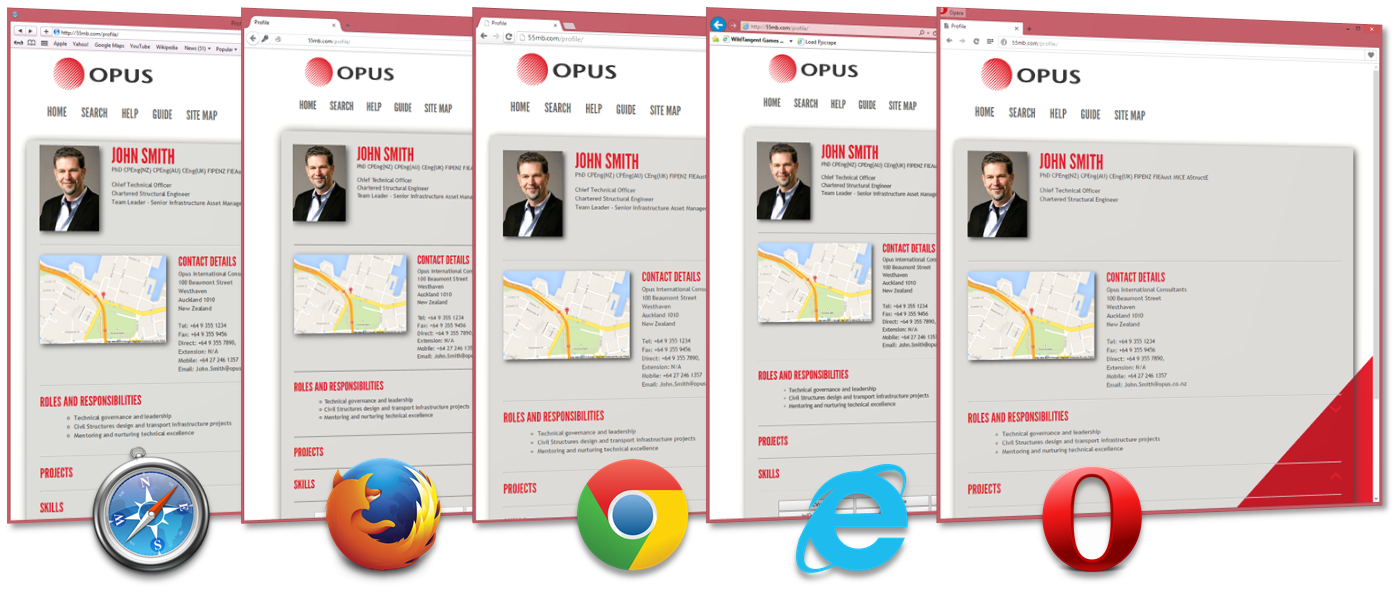
Opus Meeting 15 – 9th October 2014
I asked Sulo if she was available this week so I could show her what I had done. I had turned the website layout into a responsive one. I had also tested it across many different devices to ensure it works seamlessly between them. The layout was now more fluid and also the elements were moving around to support different screen sizes. The navigation bar had to also be adapted to better fit a mobile screen. This responsive design was tested on an iPhone, an Android Sony Xperia, a Nokia Lumia Windows Phone, a Windows Laptop on multiple browsers and also a Macbook running Safari. There were still some tweaks that needed to be done which I have planned to get ready before our next meeting as some functionality was missing. The reason I want to finish this before the next meeting is so I can present them for the final presentation. Some of these tweaks include the ability to expand/contract the navigation bar, the ability to double click to edit on a mobile phone, and getting the maps application working on the mobile phone.
Sulo had no luck in getting a copy of the database and so I mentioned that it is too late in the year to try anymore. She mentioned that I will need to demo my presentation to some people at Opus possibly on the 20th of October. Hopefully by then I will get the above functionality working and also have fixed any tiny bugs that may exist on other pages.
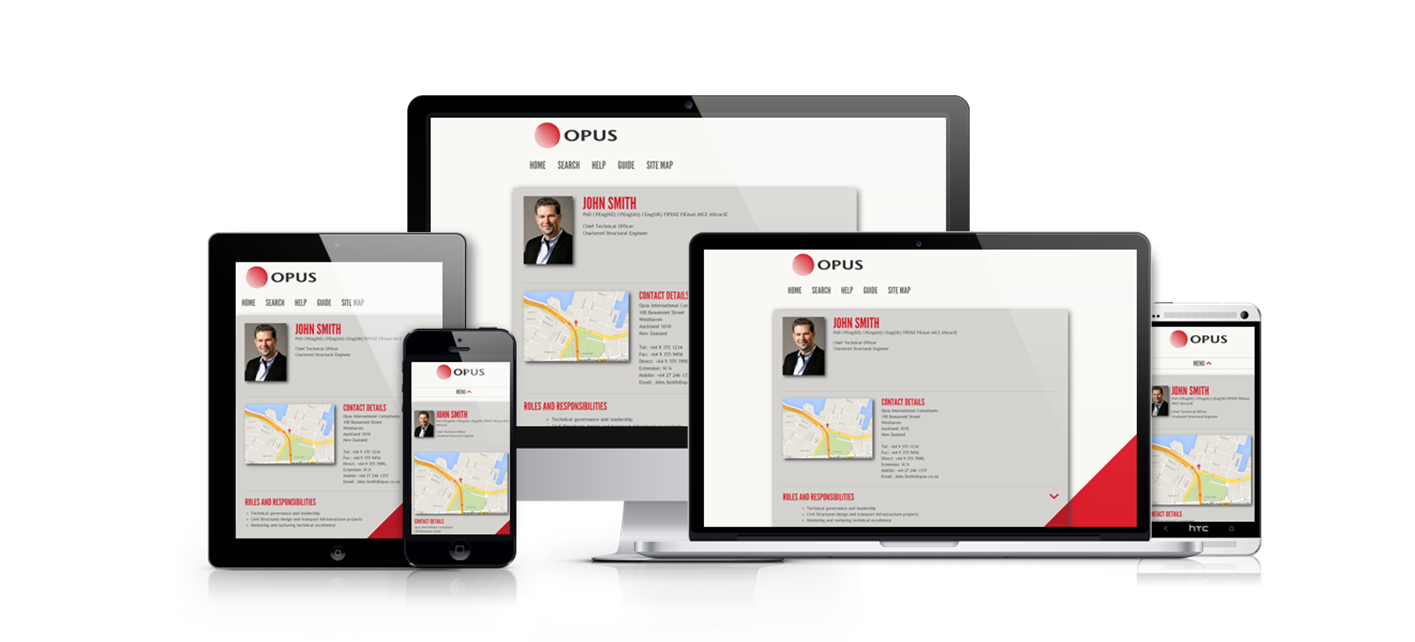 A picture showing the website overlayed on different devices. The page recognises different screen resolutions and modifies the layout to accordingly suit the device.
Final Presentations – 22nd October 2014
I was meant to be presenting to Opus on the 20th of October, however this plan got cancelled by Sulo. I did manage to get all of the mobile functionality that I wanted to implement in the last meeting working before the presentation
I had my final presentation today. Overall it went pretty well. I got some good feedback and got to take back some key points about the implementation of my project and how I evaluated it.
The first point was on how I evaluated my project. I had conducted a SUS (System Usability Scale) on 10 users, who had ranked how they feel about using the website on topics such as confidence, complexity and ease of use. One of my takeaway points was that all 10 users found the system easy to use. Patrice gave me feedback that I should not be using such statements, and it is technically incorrect. Because it is not scientifically valid, achieving 100% is never possible as there will always be outliers. On top of that because the survey conducted was not a scientific one, statistically insignificant and also an extremely small sample size that this further proves incorrectness of my statement. I took this on board and in the future will be careful about making such statements, as there is always the possibility of certain users who may not be a part of the majority that will never ensure 100% certainty.
The second point was by Mano, that apart form usability, I should also focus more on the responsiveness and performance of the website. He recommended I look into some performance testing capabilities which are inbuilt Visual Studio and take scientific measurements about the performance of my website.
I also got asked about my "Double-click to edit" feature that I had made for the profile page. I had to adapt this to mobile phones to make it "Tap and hold to edit" since the double click function normally corresponds to a zooming action on my mobile phone. The question was whether removing the double tap functionality will affect what a user is used to on a mobile phone. My response was that the double-click to zoom standard feature still works, its just the tap and hold feature which has been added on. Patrice also agreed that this was a good choice, since tap and hold normally corresponds to more actions on a mobile phone.
The link to my PowerPoint presentation slide is here. These slides are best viewed as a slideshow in Microsoft PowerPoint (2013) as there are animations that help give the true effect of the presentation slides