Serendipity Home Page
Serendipity is a process modelling and enactment environment that uses
primarily visual languages to describe process models. It also provides
a novel event-processing visual language to enable end users to define
various task automation facilities - software agents, if you prefer that
terminology.
Two versions of Serendipity have been developed to date: one using the
MViews framework (implemented in an OO Prolog on the Macs), the other,
Serendipity-II, implemented with the JViews
framework (in Java). Serendipity has the nicest interface, but no useful
collaborative usage facilities. Serendipity-II's interface isn't quite
so well-developed, but has a decentralised software architecture for collaborative
process modelling, enactment and software agent execution.
You can find out more about these environments by looking at the papers
listed at the end of this document.
1. Serendipity
The Serendipity process modelling and enactment environment supports multiple,
visual language process model descriptions. Figure 1 shows a screen dump
of Serendipity in use.
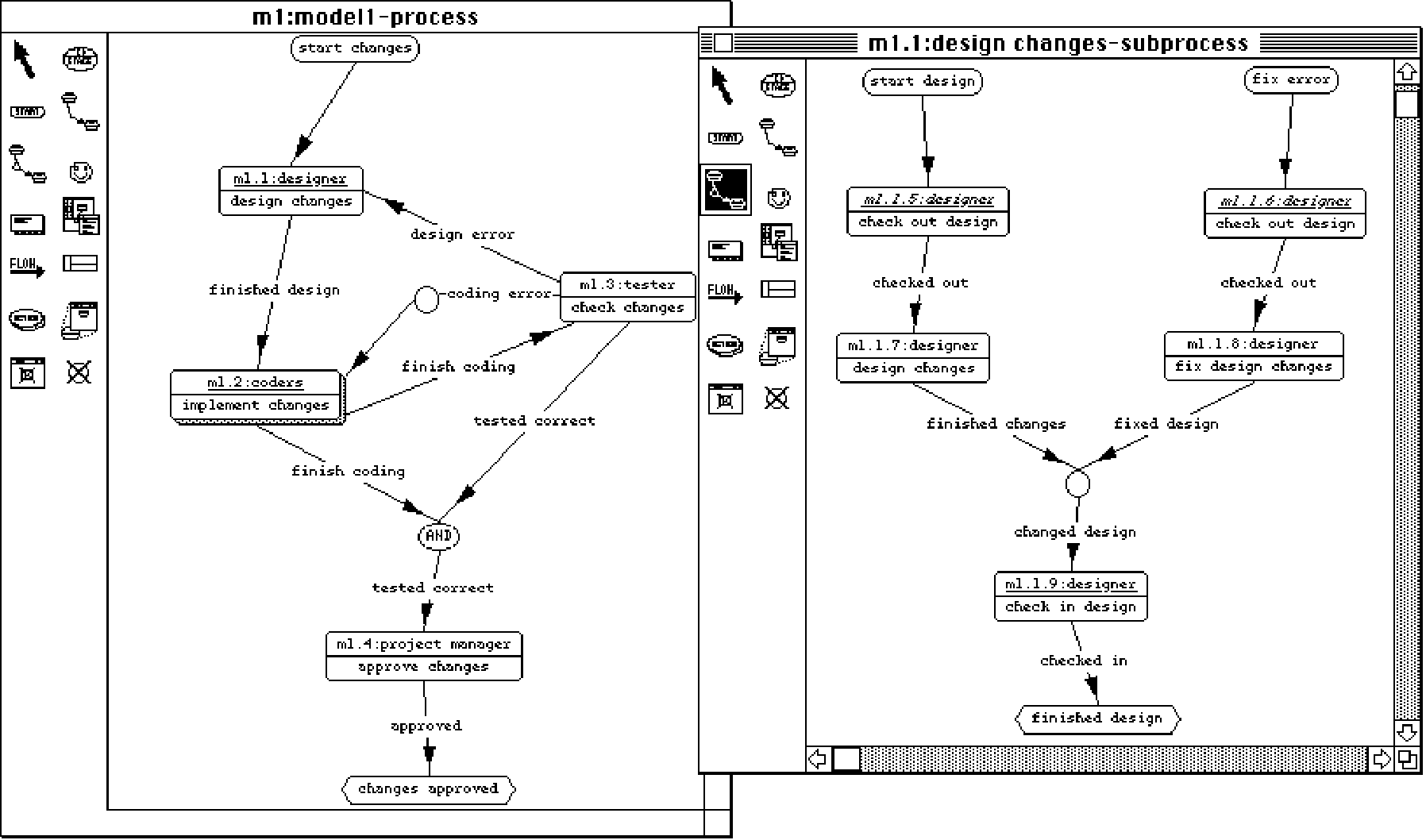
Figure 1. Serendipity in use. (from [2])
The process modelling language supports process stage (rounded rectangle
icon), user/role, artifact and tool component descriptions. These are related
with event flow, usage and composite links. Multiple views with overlapping
information can be built up, giving end users control over how the view
their process models. Full consistent management and view versioning is
supported.
Process models in Serendipity are enacted and driven by "enactment events",
which are either user-generated, generated by stages starting/stopping,
or created by software agents. Figure 2 shows an enacted Serendipity process
model.

Figure 2. Enacted process model. (from [2])
Serendipity supports software agent (or "task automation facility")
specification with a visual language for event handling. Figure 3 illustrates
a simple event handling model specified in Serendipity-II.
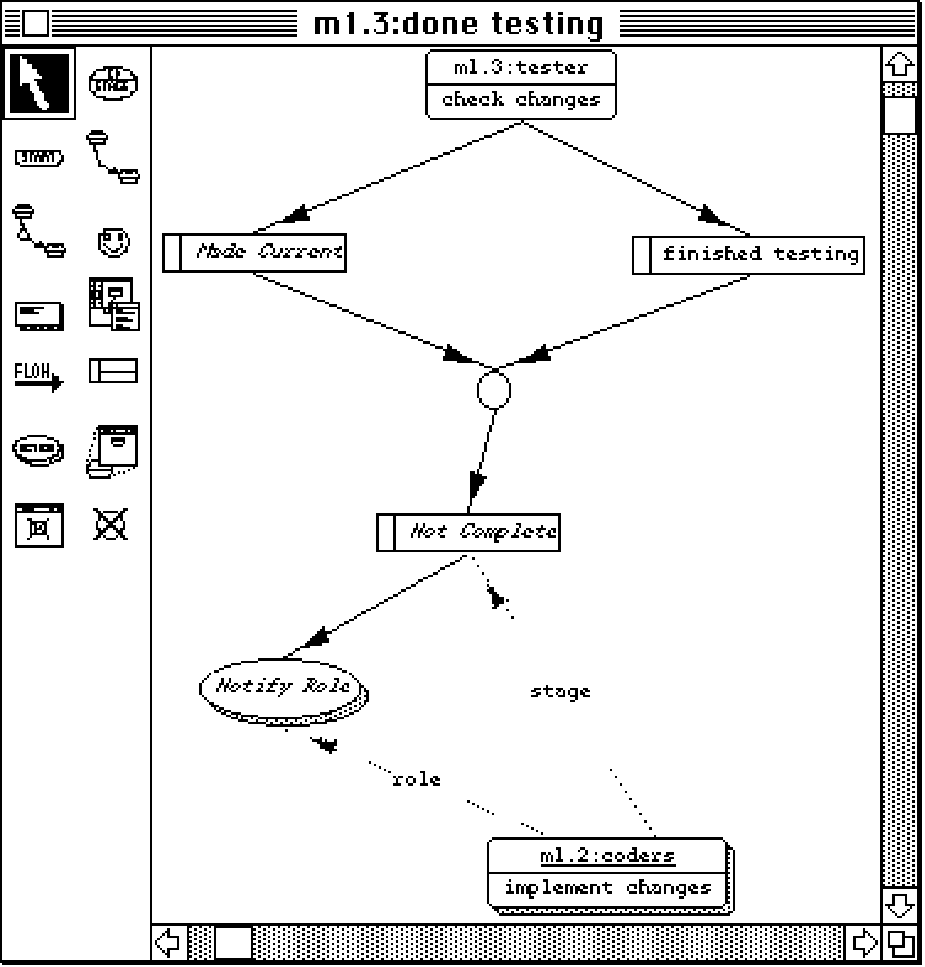
Figure 3. Simple event handling model. (from [2])
Serendipity has a centralised, client-server based software architecture.
It uses Snart (OO Prolog) object persistency and MViews-supported distribution
capabilities. This turned out to be one of its weaker points. In addition
to its lack of speed and portability, it was one of the main reasons to
moving to the Java/JViews-based Serendipity-II.
2. Serendipity-II Process Modelling
A few improvements were made to the Serendipity visual process modelling
language in Serendipity-II, but the essentials are mostly the same. Figure
4 shows a process model definition in Serendipity-II. Once again, multiple
views are supported, but also flexible view editing, with synchronous to
asynchronous modes of operation. Figure 5 illustrates an example of asynchronous
editing and incremental merging to support collaborative process modelling.
These collaborative editing facilities are provided by a JViews plug-in
component (whose presence can be detected as the "Collaboration" menu item
affordance).
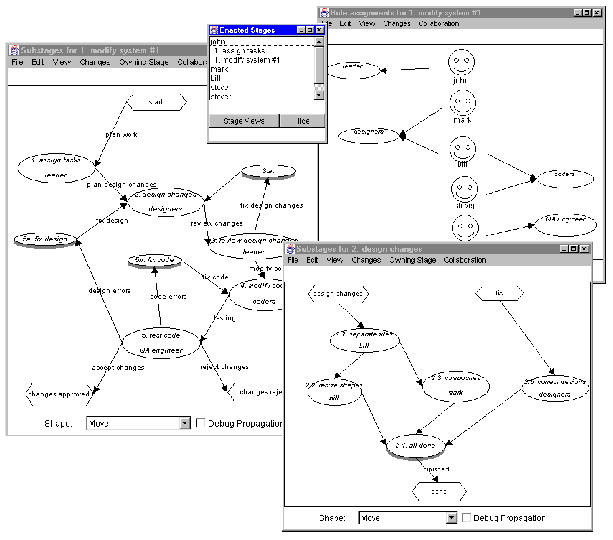
Figure 4. Process model in Serendipity-II. (from [3])
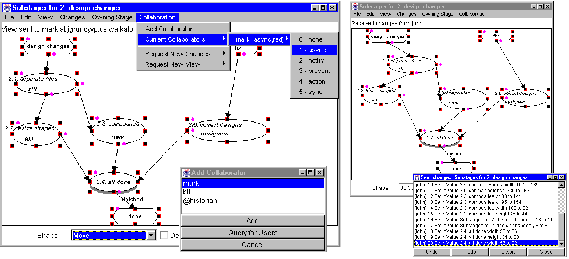
Figure 5. Asynchronous editing in Serendipity-II. (from [3])
One of the nice things about Serendipity-II is its tolerence of disconnection
from a collaborative view editing session. Shared views default to asynchronous
editing and all view edits are stored and can be exchanged to ensure users
have consistent views or at least consistent view edit histories. How view
versions can also be exchanged freely. The JViews framework provides all
the facilities to do this in a flexible, decentralised way.
3. Serendipity-II Process Enactment
Users enact process models, via a dialogue, or stage start/stop events
enact related stages, or software agents generate enactment events. Figure
6 shows an enacted Serendipity-II process model. The "to-do" list dialogue
shows enacted stages.

Figure 6. Enacted process model in Serendipity-II. (from [3])
Again, Serendipity-II supports failure of network connections by caching
enactment events and handling broadcasting of these when users reconnect.
It supports enactment of different versions of the same view between collaborating
users. Process models can also be modified while enacted.We use a simple
but pragmatic approach to supporting enactment which is tolerent of all
of these situations, and of process exception handling.
4. Serendipity-II Software Agents
A visual language is again the main way of composing and depoloying software
agents, but is much improved over the Serendipity version. In fact, this
filter/action language for Serendipity-II is a specialised form of a general
event handling visual language from the JComposer metaCASE tool, and based
on general "listener" components from the JViews frameworks. Serendipity-II
filters and actions are components which can be implemented as a composite
of other components in Serendipity-II, or as proxy JViews component object
(only the second form is properly implemented at the moment). Figure 7
shows a simple agent definition in Serendipity-II. Both local and distributed
agents are supported. More work needs to be done to make distributed agents
easier to specify and deploy, but this is in progress.
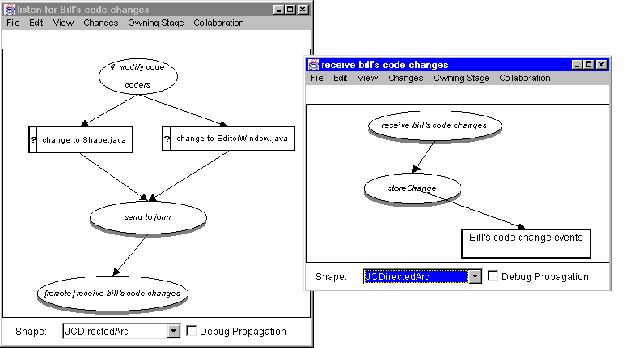
Figure 7. Software agent specification in Serendipity-II. (from [3])
5. Serendipity-II Decentralised Architecture
Serendipity-II uses a fully decentralised software architecture, with no
servers. Figure 8 illustrates the architecture.
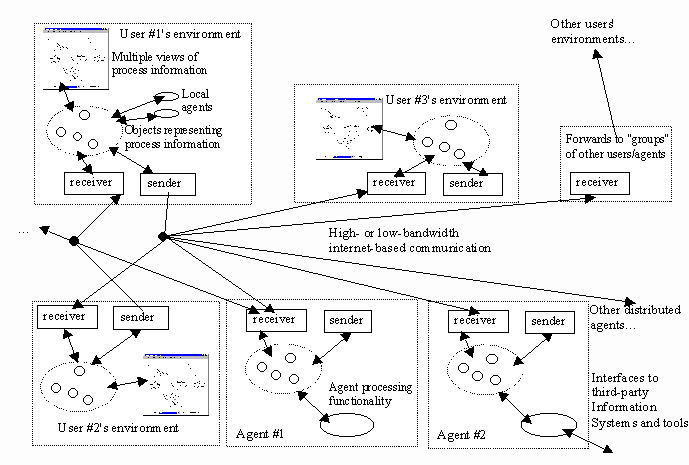
Figure 8. Decentralised Serendipity-II software architecture.
6. Future Work...
There are lots of things that can be done to improve the usability and
functionality of Serendipity-II. Some things I'm currently mulling over
(when I have time!) include:
-
better tool integration agents (some simple ones already developed)
-
easier to specify and deploy distributed software agents (in progress)
-
better decentralised architecture error-recovery (simple fault-tolerence
exists but needs improvement)
-
new/alternative approaches to process modelling using visual, goal-directed
languages
-
evaluation of visual process modelling languages (in progress)
-
better support for end user composable agents and deployment (in progress)
-
more usability studies (in progress)
Selected Publications
[1] Grundy, J.C., Mugridge, W.B., Hosking J.G. Supporting Large-scale End-user
specification of workflows, work
coordination and tool integration, Journal or End-User Computing,
Vol. 10, No. 2, May 1998, Idea Group Publishing,
pp. 39-49.
[2] Grundy, J.C. and Hosking, J.G. Serendipity: integrated environment support
for process modelling, enactment and work
coordination, Automated Software Engineering: Special Issue on Process
Technology 5(1), January 1998, Kluwer
Academic Publishers, pp. 27-60. Postscript
[3] Grundy, J.C., Hosking, J.G., Mugridge, W.B., Apperley, M.D. An architecture
and environment for decentralised,
internet-wide software process modelling and enactment, IEEE Internet
Computing: Special Issue on Software Engineering via the Internet,
Vol. 2, No. 5, September/October 1998, IEEE CS Press. PDF
[4] Grundy, J.C., Hosking, J.G., Mugridge, W.B. Inconsistency Management
for Multi-view Software Development
Environments, to appear in IEEE Transactions on Software Engineering:
Special Issue on Managing Inconsistency in Software Development, IEEE
CS Press. Postscript
Downloadable Software
I've made the .class files of Serendipity-II available on-line
for people to play with (I wouldn't recommend serious use, although we
have deployed Serendipity-II on a software development project). Its all
in a state of flux at the moment as JViews and BBW are getting major overhauls
to better use the Java 1.1 and Swing APIs.
To install Serendipity-II, you will need to:
- Download BuildByWire and JComposer. The JComposer zip file also contains a version of Serendipity-II
- Unzip these files to e.g. C:\java\BBW\ and C:\java\JComposer\. The names
of these directories doesn't matter. In the BBW directory should be
directories like bbw, jcomposer, beanbox, etc. In the JComposer directory
should be directories like Serendipity, JComposer, JCVisualise, etc. The
system should install and work Ok on a Unix platform too, though we use
it on Windows machines.
- Add these two directories to your CLASSPATH for Java 1.1 (I use jdk 1.1.4)
- Make C:\java\JComposer\ (or whatever you called it) your current
directory, and then type "sereg". This starts the light-weight registration
server (just used to exchange hostname/port number for collaboration. You can
choose not to run this if you don't want to have more than one user of Ser-II
collaborating).
- Type runse. You can register "on-line" if the registration server is
running, or off-line if you just want to use Ser-II as a single-user
environment.
Sorry about the user interface - Rick Mugridge is working on a much
nicer version - the current one is pretty glitchy and has a few
bugs...
It goes without saying that this is supplied with absolutely no warranty
at all and there are numerous bugs, features, foibles, etc. still in
it!
Back
to John Grundy's Projects page...